

What this is
The Soap Docs MCP server gives your AI coding assistant (Cursor, VS Code, Claude, etc.) direct, searchable access to this documentation site. That’s all it does. It exposes three tools:
Server URL:
https://docs.paywithsoap.com/mcp
Rate limits are 10,000 search calls and 10,000 filesystem calls per hour per domain; requests beyond that return a 429.
If your agent prefers to read documentation directly instead of calling tools, this site also publishes llms.txt and skill.md.
Install
Add the server to your editor’s MCP config as copy-pasteable JSON — no click-through required. Cursor reads this from.cursor/mcp.json in your project, or ~/.cursor/mcp.json for a global install. VS Code reads it from .vscode/mcp.json, and nests servers under a "servers" key rather than "mcpServers".
soap-docs server shows as connected in its MCP/tools settings. Then ask your assistant a documentation question, e.g. “Using soap-docs, how do I create a deposit checkout?”
Click-through alternative
Video walkthrough
Video walkthrough
Step By Step Instructions
Step By Step Instructions
1
Click on the dropdown in the 'Copy Page'
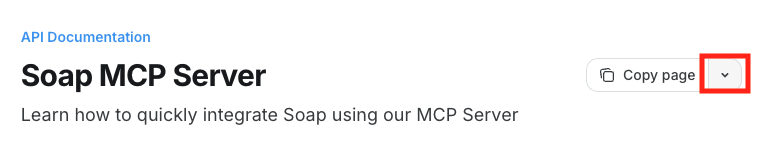
2
Select your IDE, e.g., 'Connect to Cursor'
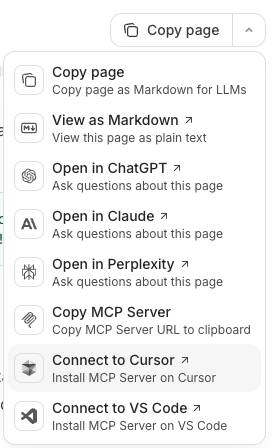
3
Authorize the MCP Server and make sure it's on in your Cursor settings.
Allow Access to Cursor (or your favorite AI IDE):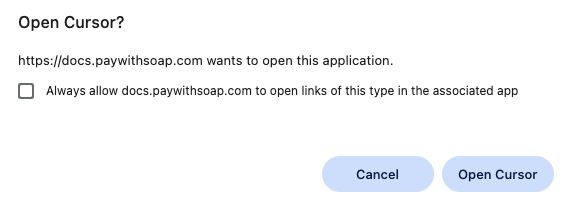
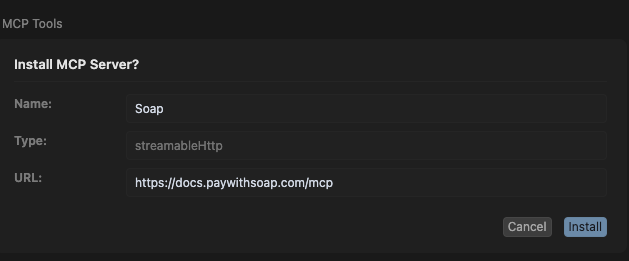
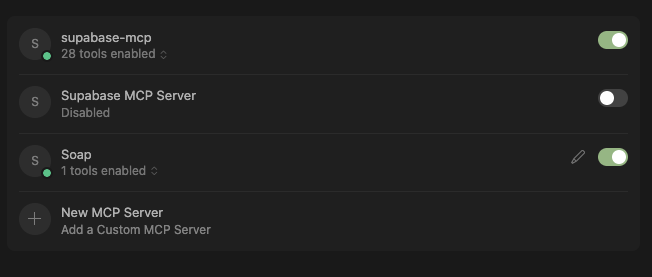
4
Talk to Soap Documentation straight from Cursor!
In Cursor Chat window: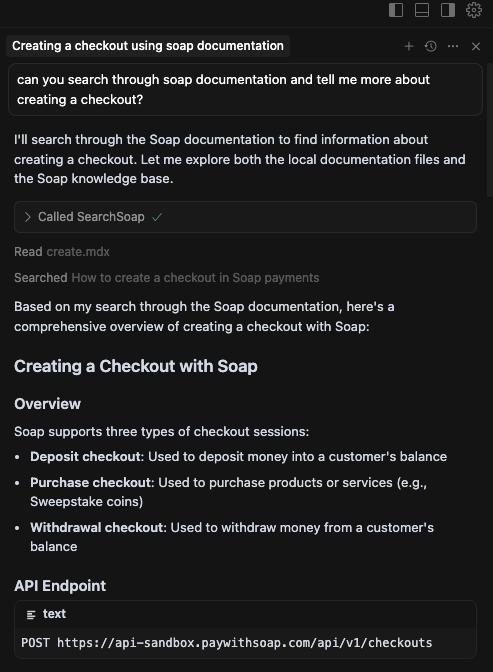
Best Practices
The MCP server searches documentation for you; it does not write or run code, and it does not touch the Soap API. Use it to ask the docs questions, then have your assistant implement the answer in your codebase.DOs
Ask specific documentation questions, then ask your assistant to implement what it learned:- “Using soap-docs, find how to create a deposit checkout, then implement it in my React application”
- “Look up how to verify Soap webhook signatures and add that verification to my Express endpoint”
- “Check which credential (API key or client secret) the device pings endpoint expects, and fix my request headers accordingly”
- “Find the hold lifecycle for withdrawal checkouts and explain what
checkout.holdrequires my webhook handler to do” - “Search the docs for Soap’s Bearer token authentication flow and generate a client that follows it”
- “Look up the checkout webhook events and add handlers for
checkout.succeededandcheckout.failed”
DONTs
Avoid vague and non-specific instructions:- “Add the Soap Integration”
- “Use Soap to do my checkout”
- “Make payments work”
- “Connect to Soap”
- “Add payment processing”
- “Set up the API”
What the MCP server cannot do
- It cannot execute API calls against Soap. It holds no credentials and exposes no tool that reaches the Soap API.
- It cannot create test data, checkouts, or customers.
- It cannot send test webhooks.
- It cannot read your account, balance, or transaction history — it only has access to this documentation.
Additional Tips
- Include your tech stack: Mention if you’re using React, Vue, Node.js, Python, Ruby, etc.
- Specify the environment: Clarify if you need sandbox or production setup
- Mention specific features: Be clear about which Soap features you need (checkouts, customers, webhooks, etc.)
- Provide context: Explain what type of product or payment flow you’re building for, such as a marketplace, digital health app, gaming flow, or agentic commerce use case